

Emotion Recognition
The product is designed to teach children how to detect emotions by understanding changes in one's body and teaching what emotion is associated with the change.
Case Study
My Role: Research, Design
Project Time: 3 weeks

Strategy Kickoff
The social problem of how to teach children emotions has no straightforward solution therefor the complexity of this project led me to do extensive research, interviewing, and to test the product early and often. To begin the questions generated were “Why are emotions important to learn?”, “How might we build activities to communicate emotions to children”, and “Who has experience teaching children emotions?”
Persona

Age: 6 years old
Education: Elementary School
Hometown: Bronx
Family: Mom and Dad
Occupation: Full-time child
"I mimic my parent without realizing what's correct and what's incorrect"
User Journey


Initial Research
By conducting a competitive audit, I found products targeted to adults and none for children. This reiterated the importance of solving this social problem. I also interviewed a 6-year-old who did not know what the word emotions meant and did not have the interest in keeping her attention on the subject for more than one question. This forced me to search deeper for more insight on the subject.
Competitive Audit
Lydia K. Triple
Mom of none
Student
Age 6

Britta: Have you ever learned about emotions?
Lydia: No, I have heard the word.
Britta: What do you think the word means?
Lydia: Motions.
Britta: No.
Britta: How about happy and sad?
Lydia: That's feelings.
Wireframing
For my wireframes I started with a three-screen flow based on the ideas I found in the apps for adults. During testing the goal was to have discussions about the social problem of confronting and learning about emotions, therefor I wanted the wireframes to be very open ended.


Marcia Skoglund
Watch the interview with Marcia a mother of three and a grandmother of 3. Although the open-ended wireframes made it hard to envision how the app would come together, the discussion led to a great point to consider about the target age range.

Sonja Hunt
Watch the interview with Sonja a psychotherapist.She had no problem envisioning the app in different ways. This led to a great conversation on industry ways of conveying information to clients.

Affinity Diagram

Actionable Insight
- make graph simple
- record own emotion
Mockups
After much deliberation and quick iterations, I decided on the app activities to teach emotions - testing heart rate, deep breathing exercises, voice recording, face recognition, and touch. These ultimately came from the research I did to find out the latest technology that an app could use to detect emotions.
Refining modern technology to be conducive for children, came together after the conversations I had with a preschool teacher and a pediatric doctor both mentioning meditation techniques as a preferred way to control emotions. This led me to Jan Rodman who is a meditation instructor. She condensed the subject down to sitting still until the body’s reactions are still. Her examples were slowing the breath, heart rate, and body movements which turned out to mimic the modern technology, but her activities were more kid friendly.
I began wireframing using XD. The flow from activity to activity changed 35 times because there was an overload of information that needed to be structured, simple, and fun. At this point, I edited information to only the basics that could fit on the screen without scrolling and tested constantly.
Meditation Techniques
Accessibility


" I don't know
what to do next "
" I can't read "


Include accessibility options because it benefits all users
6/6 users clicked on the
Usability Study
I was nervous about testing the high-fidelity prototype because it was the first time, I was testing it on the actual target user. Since I was unsuccessful in keeping Lydia’s focus in the initial interview, I figured it would not be worth my time to test a mono colored, unfinished, and not fully functioning prototype on a child. I also was worried that the app flow would not be engaging enough to keep a child’s interest until all actives were completed. Finally, I was asking a child to complete tasks that they might never have encountered before using language that was high level ie. Test your heart rate by placing two figures over your radial artery. To my surprise, the initial test on Lydia went better than expected and provided a wealth of very useful information. This in turn gave me the confidence to test the app on multiple age groups. In the end I believed I made the correct decision to only conduct usability studies on children at the high-fidelity prototype stage. Enjoy watching Lydia work through the Shine app.
Record
Own
Emotion


Testing
Heart Rate
Lessons Learned
- animation is overdeveloped
- six years old is the youngest user
- app is engaging
High-Fidelity Prototype
Next Steps
Add more to teach about emotions.
- The app taught about bodily reactions to emotions.
Britta: Did you learn about emotions?
Lydia: Yeah.
Britta: What did you learn?
Lydia: Fine. I do not remember.
Complete a larger scale study
see how children interact with the app after multiple usages
- are the activities still engaging
- can users better describe what they learned about emotions

Responsive Website
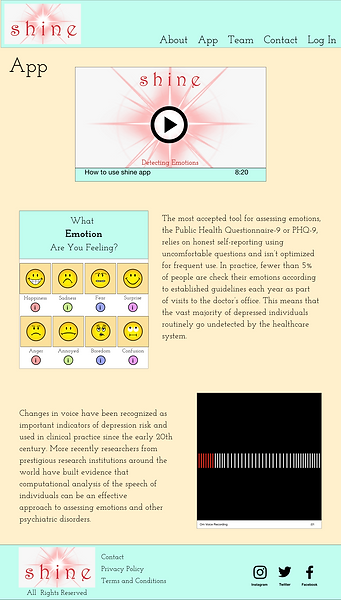
For the responsive website, more information about the app can be found. This is a tool to help bring awareness to anyone interested in the app or ways to help teach emotions to their children. The audience is going to be adults, wanting to learn more about the benefits and the research behind the app. I see the responsive website as a way to advertise the product to parents.
Persona
Andy Marks
is a father to two children and is always looking for ways to teach his children life long skills. Emotional intelligence is one he hopes his children learn so he is researching all the products on the market
Age: 42 years old
Education: Masters in Business
Hometown: Manhattan
Family: Wife and two children
Occupation: Stockbroker

Wireframing


Mockups
Iteration - added container box


Iteration - changed page title placement

Usability Study
Iteration - unchecked "Fix Position When Scrolling"

